


How to buy USDT in Syria with Syrian pounds
By Youssef Adel · Last updated:
| P2P ads on 22 October 2026 (buy from / sell to) | Binance 41 / 38 |
| Main exchange | Binance (most Syrian pound P2P ads) |
| Most common payment method | Sham Cash, then bank transfer |
| Verification | Passport, driver's license or ID card |
| The app | Sign up from our button in your browser first, then download the app straight from the Binance website (app stores aren't supported in Syria) |
Step 0: sign up from our button first, then get the app the right way
Create your Binance account first, from the button below, in your browser on your phone or computer. You don't need the app to sign up. After that, for the app: According to Binance, Google Play and the App Store aren't supported in Syria yet. Download the app straight from the official Binance website, or use the website in your browser. Don't install copies shared in groups or links someone sends you. Who can sign up, which Binance products work for Syrian users and what to do about an old blocked account: Binance in Syria.
How to buy USDT in Syria, step by step
1. Create your account
Open the sign-up page from the button on this page, in your browser. Sign up with your email or phone number and choose a strong password. Full guide
2. Verify your account
Choose Syria as your country of residence and upload a valid government ID: a passport, driver's license or ID card. Then complete the face check. Full guide.
3. Open P2P and choose the Syrian pound
Add Funds → P2P Trading, then USDT and the currency SYP.
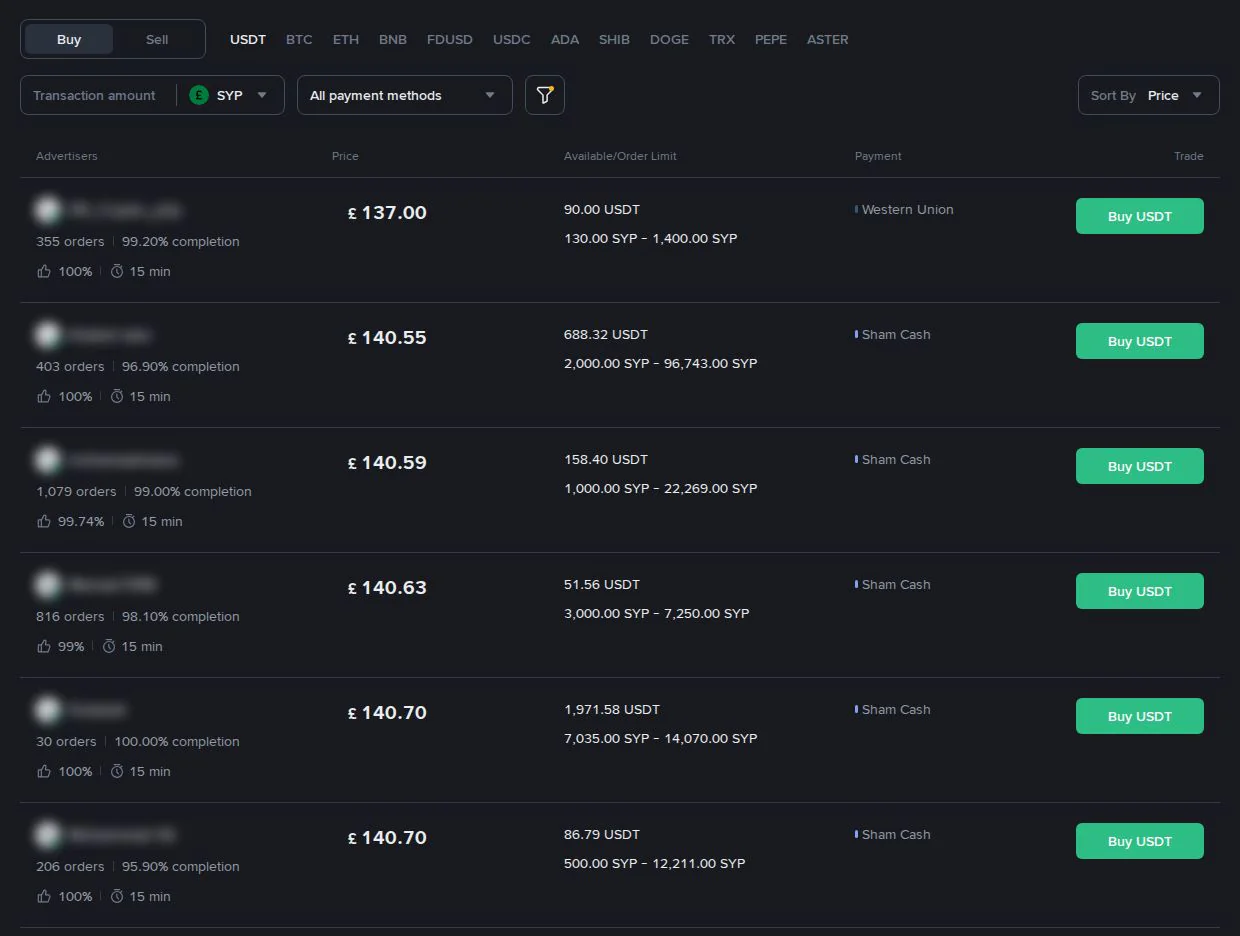
4. Pick a seller who accepts Sham Cash
Filter by the payment method Sham Cash, then compare the price, the order limits and the seller's number of trades.
5. Pay from a Sham Cash account in your name
Tap Buy, enter the amount, then Place Order. Open View payment details and send the exact amount from a Sham Cash account in your own name to the account shown in the order.
6. Tap [Transferred, notify seller]
Only after you've actually sent the money. Don't cancel the order after paying, and don't contact the seller outside the order chat.
7. Your USDT is in your Funding wallet
Once the seller releases it, you'll find your USDT in your Funding wallet. That's your "USDT wallet" on Binance, and it's where you can sell or send from later.
The full guide, with every warning: How to buy USDT on Binance P2P.
A USDT wallet in Syria: what does that mean?
Lots of people search for a "USDT wallet in Syria". In practice, you have two options:
- Your Binance account: it holds your USDT, and it's where you buy and sell for Syrian pounds on P2P. This is the easiest option for beginners.
- A USDT deposit address: on Binance, go to Deposit → USDT → choose the network (TRC20, for example) → copy the address. This is the address you give to anyone who wants to send you USDT. USDT networks explained.
Which exchanges are open to Syrians?
- Binance: available, and home to most of the Syrian pound P2P market.
- OKX: not available to people living in Syria.
- Bybit: not available to Syrian nationals wherever they live.
- Bitget: available, but it has very few Syrian pound ads.
Full details in Withdraw USDT in Syria.
Frequently asked questions
Can I create a Binance account in Syria?
Yes. Binance has announced that Syrians living in Syria can sign up and get verified.
Can I buy USDT with Sham Cash?
Yes, through Binance P2P: pick a seller who accepts Sham Cash and pay them from your own account.
Which document do Syrians need for Binance verification?
A valid government ID: a passport, driver's license or ID card.
Where do I find my USDT after buying?
In your Funding wallet on Binance.
How do I download the Binance app in Syria?
First create your account from the button on this page, in your browser. Then download the app straight from the official Binance website, because the app stores aren't supported in Syria, and log in with that account. Or keep using the website in your browser.
Are OKX or Bybit an alternative in Syria?
No. OKX isn't available to people living in Syria, and Bybit blocks Syrian nationals.
Last updated: 10 October 2026 · Sources: Binance's official Syria launch page, the Syrian pound P2P page (10 October 2026), and Binance's official help page on buying via P2P.
Related tutorials
- Withdraw USDT in Syria (2026)Withdraw USDT in Syria: sell on Binance P2P and get paid to Sham Cash or by bank transfer, which exchanges Syr…
- How to Buy USDT on Binance P2P in 2026How to buy USDT on Binance P2P by bank transfer or local e-wallet: picking a seller, paying, the Transferred b…
- Withdraw USDT in Palestine (2026)Binance P2P doesn't support the shekel. Here's where to buy and withdraw USDT in Palestine (Bybit, OKX, Bitget…
- How to Buy USDT in Iraq (2026)Buy USDT in Iraq with dinars on P2P, paying by ZainCash, Qi Card (SuperQi) or FIB: why OKX is strong in Iraq a…
- How to Buy USDT in Jordan (2026)Buy USDT in Jordan with Jordanian dinars on P2P, paying by CliQ, Orange Money or Zain Cash: which exchange has…
- Common P2P Scams and How to Avoid Them (Buyers and Sellers)7 common P2P scams (fake receipts and SMS, third-party payments, middlemen, triangle scams, fake staff) and si…
- How to Send USDT in 2026How to send USDT to someone: Binance Pay by email, phone or Binance ID with no network to pick, or withdraw to…
- USDT NetworksUSDT networks explained: TRC20, BEP20 and ERC20, picking one to withdraw or deposit, what happens if you choos…